

What’s New in Qlik Cloud
– February 2026 Updates –
Welcome to the next edition of the ‘What’s New in Qlik Cloud’ blog for February 2026!
Authors: Roger Gray, BI Manager & Tom Cotterill, BI Consultant, at Climber.
Data Analytics
This month’s release add new capabilities across analytics, integration, governance, and reporting. These updates focus on secure collaboration, simpler administration, and better access to insights across tools commonly used by organisations.
1. Dataset Search now supports Semantic Queries
The navigation bar search now supports semantic search for datasets. Users can describe what they need using natural language. Qlik then matches intent based on meaning, not just exact text.
This feature supports multiple languages and helps users find datasets faster, even when names or descriptions differ.
2. Enhanced Accuracy for Knowledge Bases
You can now enable enhanced accuracy for new knowledge bases.
This option improves how content is processed by:
- Creating more relevant text chunks
- Improving table parsing
- Supporting better answers from PDF, Word, and PowerPoint files
This leads to clearer responses and more reliable results when users query knowledge content.
3. Word and PowerPoint Reporting now available
Qlik Reporting Service now supports Microsoft Word and Microsoft PowerPoint outputs.
New Microsoft 365 add-ins allow report developers to:
- Create Word reports in .docx or .PDF format
- Create PowerPoint presentations in .pptx or .PDF format
- Use data directly from Qlik Sense apps
The experience matches the existing Excel add-in, providing a consistent workflow across Microsoft tools. Customers using the existing reporting manifest will need to deploy an updated version to access these new add-ins.
4. Write Table now available in Qlik Cloud Government
Write Table is now supported in Qlik Cloud Government. Users can edit data directly within analytics apps, while Teams can add comments, update values, and see changes sync across sessions in real time.
Key benefits include:
- Shared data updates across users
- Clear tracking of changes
- Export of updates through Qlik Automate
Write Table is available from the Chart Library when editing an app. This feature supports collaboration while maintaining governance standards required in regulated environments.
5. New Mailbox Connectors with OAuth Support
Two new connectors are now available:
- Mailbox IMAP OAuth
- Mailbox SMTP OAuth
These connectors support OAuth 2.0 authentication. Users can securely read mailbox content through IMAP and send emails through SMTP without using basic authentication.
This update improves security and aligns with modern identity standards commonly used across Microsoft and enterprise email platforms.
6. Developer Role removed and API Key Management simplified
The Developer role has now been fully removed, following its deprecation in June 2025. API key access is now controlled through the Manage API keys permission, which administrators can assign within a custom role.
Important changes include:
- The Enable API keys toggle has been removed from Administration settings
- API key creation depends entirely on assigned permissions
- Users or groups not migrated may experience access issues
Administrators should review role assignments to ensure continued access to APIs and automations.
7. Business Logic Improvements for Faster Setup
Two updates improve how business logic is managed and maintained.
a) Logical Group Selection at Creation Time
When a custom logical model is active, new master dimensions and measures must belong to a logical group to support natural language queries.
You can now select the logical group during item creation. This removes the need for a separate configuration step and ensures immediate availability for search and chat experiences.
b) Bulk Vocabulary Management using Excel
Vocabulary synonyms can now be managed in bulk using Excel imports.
Users can:
- Add multiple synonyms at once
- Edit or remove groups in a single action
- Reduce time spent managing large vocabularies
This change supports faster rollout and easier maintenance of semantic models.
8. New Direct Access Gateway Version 1.7.10
Direct Access gateway version 1.7.10 is now available. This release includes new features and resolved issues.
a) Delimit Column Names for ODBC Connections
A new option allows column names to be automatically delimited when required.
This supports sources that use:
- Upper case column names
- Special characters
The option removes the need to manually edit load scripts when previewing or loading data.
b) Metrics Data Quota Control
A new property allows administrators to set a size limit for metrics data stored on the gateway machine.
- The quota is defined in megabytes
- Older data is removed when the limit is reached
- Configuration is supported via JSON or the Public API
This helps manage local storage and supports stable gateway operation.
Data Integration
This month may be light on updates, but what is included focuses squarely on workflow and day-to-day usability. Microsoft SQL Server CDC can now be used with Google Cloud through a familiar connector, reducing friction for hybrid deployments. Alongside this, the new Create page in the Data Integration activity centre brings key assets and actions into a single, more intuitive starting point.
1. Support for connecting to Google Cloud via the Microsoft SQL Server (MS-CDC) source connector
The Microsoft SQL Server (MS-CDC) source connector can now be used to connect to SQL Server instances running on Google Cloud. This is a neat and powerful update. It extends the existing cloud provider support and enables change data capture from Google Cloud SQL for SQL Server using the same connector and configuration approach already available for other environments.
In practical terms, this means SQL Server is now treated consistently regardless of where it’s running. Whether the source is on-premises, hosted in Azure, or running on Google Cloud SQL, the same Microsoft SQL Server (MS-CDC) connector can be used, with a consistent configuration and operational model.
For more information, see: Microsoft SQL Server (Microsoft CDC based)
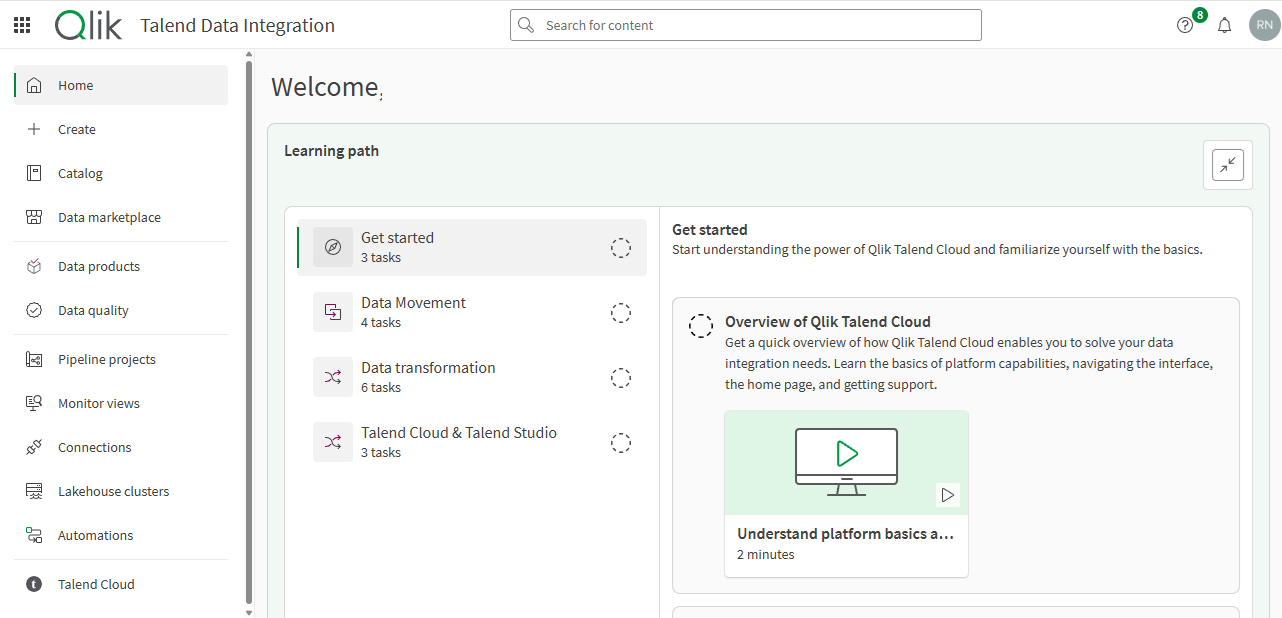
2. Create page in the Data Integration activity centre
Qlik Talend Cloud now includes a dedicated Create page within the Data Integration activity centre, providing a single, consistent starting point for building new assets. Rather than beginning from a specific context (such as pipelines, connections, or data quality), the Create page is designed around a simpler intent: I would like to create something new.
From there, you can choose the type of asset you want to build and move straight into configuration:
- Build Pipeline Projects: Start a new data integration flow to replicate, transform, and orchestrate data across your estate.
- Create Data Products: Package trusted datasets into sharable products for analytics and consumption.
- Define Connections: Add connections to sources and targets so your pipelines and datasets can access the data they need.
- Register Catalog Assets: Create registered datasets or other catalog objects to explore, govern, and reuse across projects.
- Set Up Data Quality Rules: Create validation rules, semantic types, and quality checks to monitor and enforce data standards.
- Explore Marketplace Options: Initiate or publish data marketplace content to share or consume curated datasets.
- Create Lakehouse Clusters: Define and manage Lakehouse clusters used by pipeline projects, including compute sizing and scaling behaviour.
Benefits
These clusters provide the execution environment for Lakehouse-based ingestion and transformation workloads, such as Apache Iceberg-backed pipelines. This feature doesn’t replace contextual creation elsewhere in the platform. You can still create assets using the traditional method. The Create page offers an alternative, central entry point that reduces navigation friction, particularly for users starting new work or exploring capabilities.
The approach has already been adopted in Qlik Cloud Analytics, where a dedicated Create page already acts as a launchpad for new content. Bringing the same pattern into Qlik Talend Cloud helps maintain parity across Qlik Cloud products, making the move between Analytics and Data Integration feel cohesive and familiar.
For more information, see: Qlik Talend Data Integration activity centre
Summary
Overall, this release is a smaller but first-class delivery. With clarity and consistency front and centre, the focus is on helping everyday integration run smoothly. Next month, you will learn all about the latest Agentic AI updates in Qlik Answers!
SUBSCRIBE
Want to stay up to date with the latest features that are released in Qlik Cloud?
Subscribe to our blog and get monthly updates directly to your inbox.
WANT TO KNOW MORE? CONTACT US!
Janne Timonen
BI Manager
janne.timonen@climber.fi
+358 40 773 0793
Mika Ahtinen
Senior Customer Success Manager & Advisor
mika.ahtinen@climber.fi
+358 40 715 4079
Uutiset
What’s New in Qlik Cloud – February 2026
This release add new capabilities across analytics, integration, governance, and reporting. The updates will help your organisation with more secure collaboration, simpler administration, and better access to insights across tools commonly used by organisations.
>> Read more
Agentic AI from Qlik: Delivering smarter, faster decision making
Qlik’s Agentic AI framework is the next evolution of Qlik’s AI assistant, Qlik Answers, that delivers smarter, faster, and more actionable insights from your data. Watch this webinar on-demand to experience the new features and capabilities in Qlik’s unique Agentic AI platform.
>> Watch now
What’s New in Qlik Cloud – January 2026
New year, new features! Qlik kicks off 2026 with a strong set of enhancements in Qlik Cloud. The January release introduces analytics updates that support stronger governance, faster development, and simpler analytics delivery. Across data integration, this month includes expanded API controls, broader file-based dataset support, and more expressive validation rule capabilities.
>> Read more